• Home
  • Suggest A DIY
  • DIY Newsletter

Craft Gossip

Independent craft blog since 2007

  • About CraftGossip
  • Our Network
    • Bath & Body Crafts
    • Candle Making Ideas
    • Crochet Ideas
    • Cross Stitch
    • Edible Crafts
    • Felting Patterns
    • Glass Art
    • Home & Garden Ideas
    • Indie Crafts
    • Jewelry Making
    • Kids Crafts
    • Knitting Patterns
    • Lesson Plans
    • Needlework
    • Party Ideas
    • Polymer Clay
    • Quilting Ideas
    • Recycled Crafts
    • Scrapbooking
    • Sewing Patterns
    • Card Making
    • DIY Weddings
    • Not Craft Ideas
  • Giveaways
  • Roundups
  • Store
  • Search

New Online Photo Editor

August 29, 2009 by Francine Clouden

index-mixed2

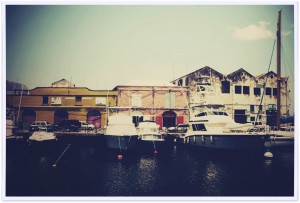
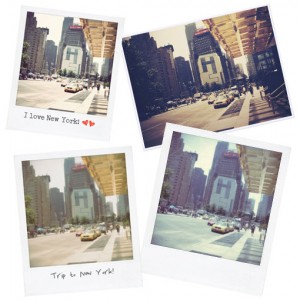
Rollip is a new site offering a simple online photo editing tool. You can convert your photo in a variety of ways and do so in two formats, either Polaroid, or regular size. The effects include various sepia tones, soft focus, and neon effect.  Using the site is simple, just click on the image of the effect you want, and follow the instructions to upload your photo.

I tried out the editor on this photo
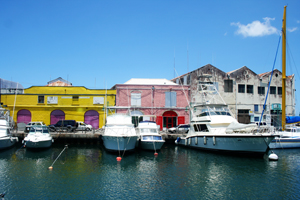
IMG_6501

And converted it to a  Polaroid as well as gave it a vintage look as you can see at left.
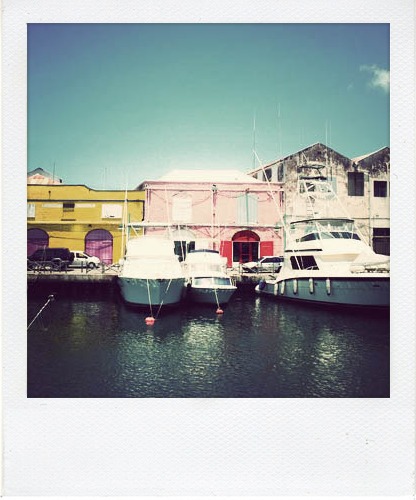
rollipimage1

rollipimage2

If you choose to make your photo into a Polaroid, you also have the option of adding text or decorations to the edges of the image as shown
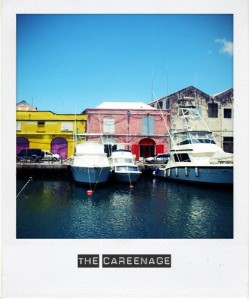
rollipimage4

Once the transformation is complete you have the following options

1. Download your photo

2. Share a direct link in email, on a website or in instant messaging

3. Share the photo in e-mail, on Facebook, MySpace or a variety of other social media websites

If you use Flickr, you can also share your Rollip creations in the Rollip group.

I quite like this site and can see myself converting a variety of photos. it’s simple and quick. My main reservation is with regards to the file sizes of the converted photos which are quite small (less than 100K in some cases, and only 400 pixels wide). I haven’t had a chance to print them out to see the quality, but according to the site you should be able to print the photos out.

I also would like it if the different conversions were given names, so that it would be easier to distinguish between them. Also suggestions as to what kind of photos work well with each conversion would be useful. But with a little time and trial and error I think that anyone can get neat effects on their favourite photos!
Click here to go to Rollip to try it out!

«
»

Have you read?

Easy Fonts to Add to Your Cross Stitch

I don’t usually cross stitch text or add words to my cross stitch projects. Sometimes I will sign things using basic block lettering worked in backstitch (luckily my initials are pretty easy to stitch), but if you give your cross stitch as a gift or otherwise want to personalize it, adding text is a great way to go. 

But if a project didn’t already come with text, and you don’t want to draw your own, you’ll need a good cross stitch font that you can use for your project. 

I like collecting fonts that are easy to read and to stitch and that would be good for lots of different uses. 

For example I really like this bold alphabet font from Cross Stitch with Art, which has both capital and lowercase letters as well as numbers if you need them for dates or other information on your design. The capital letters are an inch/2.5 cm/14 stitches tall, which makes it easy to figure out how much space you need to leave for them. It’s a nice, basic, readable serif font you can use for lots of project. 

If you want a script font that’s still really readable, check out Magic Calligraphy from Soft Pattern Designs. This hand drawn font has upper case letters around 28 stitches tall, with lower case letters mostly being around 20 stitches (though the ones that go up or down a lot like f, p and y are bigger). The numbers also vary a bit in size but range from 25 to 29 stitches. 

Sometimes you just want a classic font that looks like sports lettering, and in that case you’re going to need Varsity, an all caps font from Stitch Mod. This one has letters that are 21 stitches tall, and it includes capital letters and numbers. But there are definitely times this one would come in handy!

Another sometimes useful and really cute font is this alphabet block letters alphabet from Stitch Junction. These letters are all upper case and look like classic building blocks, and there are also numbers available. This one would be perfect for a birth announcement project or some other cross stitch for the baby’s room. 

And if that’s not enough for you, check out this post with 85 free cross stitch fonts for you to try!

RSS feed: More Articles More Articles

  • Easy Fonts to Add to Your Cross Stitch
  • 10 Cat-Themed Scrapbook Layout Templates for Single-Page Designs (Perfect for 2–3 Photos of Your Favourite Feline)
  • Patchwork Blanket Knitting Patterns
  • DIY Ghost Wreath Using a Wire Coat Hanger: Easy Light-Up Halloween Decor
  • DIY Clay Flower Frog Tutorial – A Handmade Tool for Arranging Blooms
  • DIY Vintage Halloween Tin Can Decor With Printable Autumn Artwork – Free Printable
  • 10 Craft Gifts for Tweens Who Have Outgrown Kids’ Kits
  • Spooky Season Sweater Embroidery Design – Etsy Review
  • 5 FREE Bats and Moons in Windows SVG Die Cut Files for Halloween
  • The Forest Valley Shawl – Crochet Pattern

Pick Your Blog

  • Sewing
  • Knitting
  • Quilting
  • Crochet
  • Home & Garden
  • Recycled Crafts
  • Scrapbooking
  • Card Making
  • Polymer Clay
  • Cross-Stitch
  • Edible Crafts
  • Felting
  • Glass Art
  • Indie Crafts
  • Kids Crafts
  • Jewelry Making
  • Lesson Plans
  • Needlework
  • Bath & Body
  • Party Ideas
  • Candle Making
  • DIY Weddings
  • Not Craft
  • Free Craft Projects

Copyright © 2026 · CraftGossip | Start Here | Contact Us | Link to Us | Your Editors | Privacy and affiliate policy